Take Control of Your M-PESA Finances
myPesa automatically tracks and organizes your M-PESA transactions by securely reading your SMS messages, transforming them into meaningful financial insights.

Available only for Android devices
See myPesa in Action
Powerful features to help you track, organize, and understand your finances
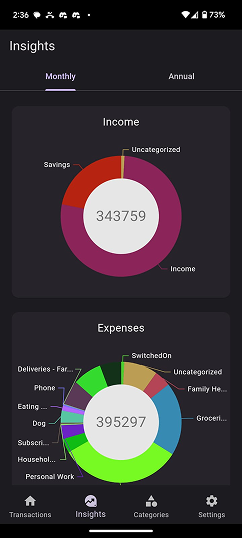
Detailed Insights
Track income and expenses with beautiful visualizations
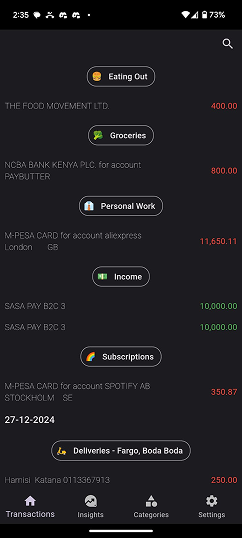
Smart Categorization
Automatically categorize your transactions
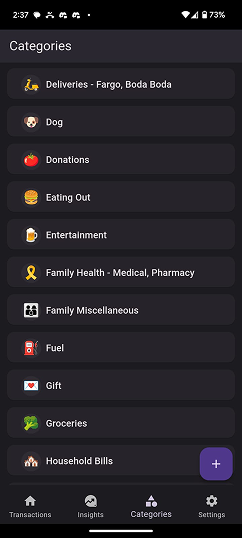
Customizable Categories
Organize your finances your way
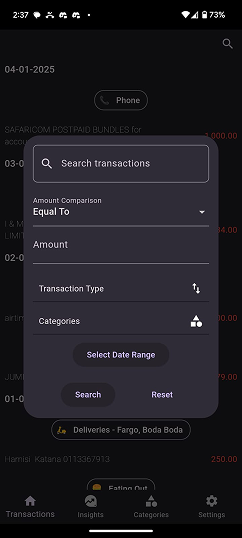
Advanced Search
Find transactions quickly with powerful filters
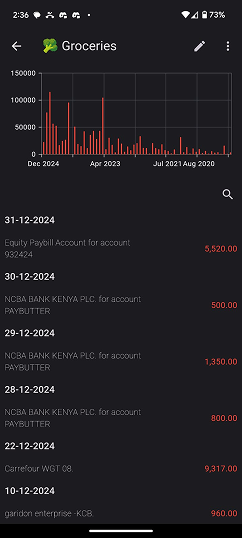
Category Analysis
Dive deep into your spending patterns
Everything you need to manage your M-PESA finances
myPesa provides powerful features to help you track, organize, and understand your M-PESA transactions.
Automatic Transaction Tracking
Automatically captures and organizes your M-PESA transactions directly from SMS messages. No manual entry needed.
Smart Categorization
Organize transactions into customizable categories with smart suggestions based on your transaction patterns.
Detailed Insights
View spending patterns by category, track income and expenses over time with beautiful charts and visualizations.
Export & Backup
Export transactions to Google Sheets, backup your data securely, and customize date ranges for exports.
Privacy Focused
Works completely offline with no sensitive data leaving your device. Your financial data stays private.
Advanced Search
Find transactions quickly with powerful filters for date ranges, amounts, and categories.
How myPesa Works
Simple, secure, and automatic tracking of your M-PESA transactions
Grant SMS Access
Install myPesa on your Android device and allow it to securely read your M-PESA SMS messages. Your data never leaves your device.
Automatic Processing
The app automatically detects and processes M-PESA transactions from your SMS inbox.
View Insights
Explore your financial data through intuitive charts, reports, and categorized transactions.
What Our Users Say
Hear from people who use myPesa to manage their finances
"myPesa has completely changed how I manage my M-PESA transactions. The automatic categorization saves me so much time, and the insights help me understand where my money goes."
John Mwangi
Nairobi, Kenya
"I love that I can finally track all my M-PESA transactions in one place. The app is so easy to use and the charts make it simple to see my spending patterns. Great for budgeting!"
Sarah Wanjiku
Mombasa, Kenya
"As a small business owner, myPesa helps me separate personal and business transactions. The export feature is perfect for my accounting needs. Highly recommend!"
David Omondi
Kisumu, Kenya
Frequently Asked Questions
Find answers to common questions about myPesa
Is my financial data secure?
Does myPesa require internet access?
Can I export my transaction data?
Does myPesa work with other mobile money services?
Is myPesa available for iOS?
How far back can myPesa read my transactions?
Does myPesa work with multiple M-PESA accounts?
Ready to take control of your finances?
Download myPesa today and start tracking your M-PESA transactions automatically.
Available only for Android devices